Auto login is a feature of NAQuest 3.0 that will generate a new respid and password combo with the respondent and automatically log them in. The respid and password are created the moment the respondent presses the start button on the start page. Query string variables can still be passed to autogenerated variables like a normal id. If you want to bypass the autologin, you can also provide a respid and password in the querystring. When you pass in a respid and password, the program will log in the respondent with the credentials you pass in instead of generating a new one.
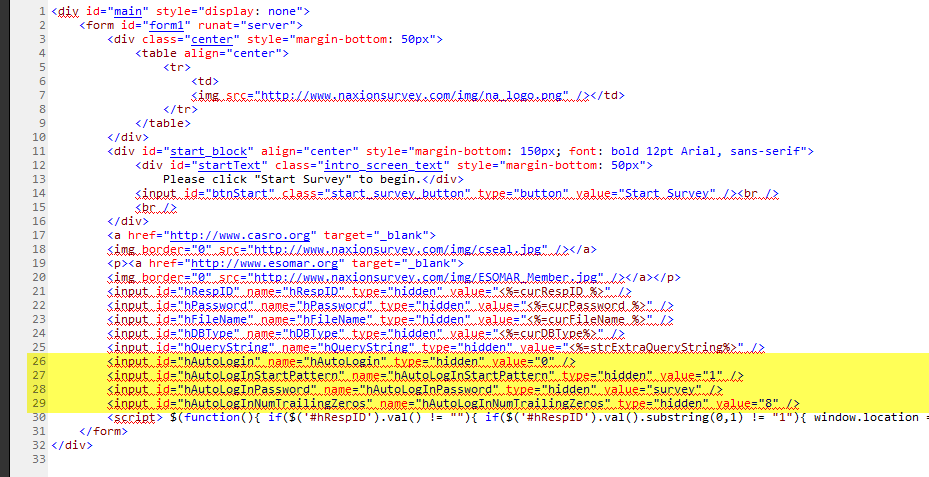
The are several fields in the start page that need to be properly set in order to enable auto login. To begin, import the standard start page. After it's been imported, switch to the HTML view of the start page. I recommend copying the html into a HTML editor like Web Expressions then reformatting the HTML in order to make it easier to read. There will be four input values in the HTML that you will need to set. They are:
- hAutoLogin: 1 will enable auto login 0 will disable auto login
- hAutoLogInStartPattern: The string to start all auto generated IDs with. For example, setting it to "1" will created IDs starting with "1". Setting it to "300" will start all ids with "300".
- hAutoLogInPassword: The password to use for the auto generated ID.
- hAutoLogInNumTrailingZeros: The number of digits following hAutoLogInStartPattern. If hAutoLogInStartPattern is "1" and hAutoLogInNumTrailingZeros is "8", all auto generated ids will be 9 digits starting with a lead digit of "1". If hAutoLogInStartPattern is "300" and hAutoLogInNumTrailingZeros is "5", it will generate 8 digit ids with leading digits of "300".
NOTE: Auto login will also work on the TEST server.